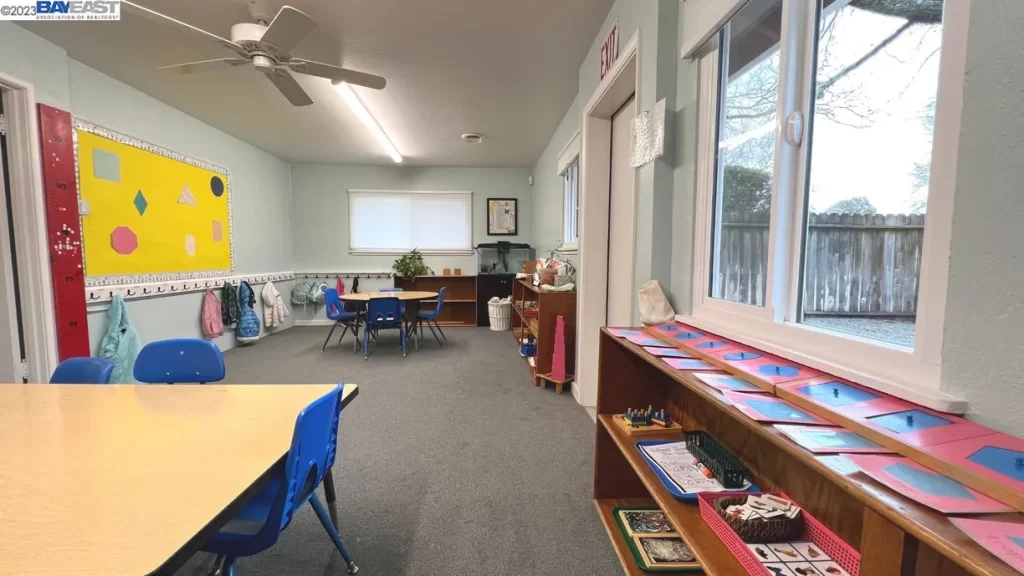
Safe and best Preschool in Fairfield CA 94533

Looking for an affordable Daycare ? We are accepting Subsidy kids at Licensed Fairfield Montessori Call us for more details about subsidy kids program .

We offer : Montessori curriculum Montessori emphasizes self-directed learning and exploration, so flexibility and adaptation to the children’s interests and pace are key.

App for Facilitating Communication Between Parents and Teachers: We utilize the Procare App for parent-teacher communication, sharing pictures that provide updates on your child’s progress throughout the day.

Safety and Security : We have employed a secure app, and only our enrolled clients possess the access code to open the door, guaranteeing the safety of the children in our program.

Small ratio of children to teachers: We maintain the lowest teacher-to-child ratio, ensuring personalized care for each child, with a focus on delivering high-quality nurturing

Business Phone Number
(707) 427-1442
 
Business Address
1101 UTAH STREET
94533
daycare_status
LICENSED

At the end of his life, Steve jobs names 5 Undeniable truths:

  1. Don’t educate your children to be rich, educate them to be happy.

So when they grow up, they will know the value of things and not the price.

2. Eat your food as your medicine, otherwise, you have to eat medicine as your food.

3. The six best doctors in the world are:

  • Sunlight
  • Rest
  • Exercise
  • Diet
  • Self-confidence
  • And Friends

Maintain them in all stages and enjoy a healthy life.

4. If you just want to walk fast, walk alone, but if you want to walk far, walk together.

5. The ones who love you will never leave you. Even if there are 100 reasons to give up, they will find one reason to hold on.

Functional Specification Documents

Interviewer in hashtagTCS asked me about Functional Specification Document Contents

A Functional Specification (FS) document in SAP is a detailed description of the RICEFW requirements penned down in document. It connects what the business needs with the technical details, making sure the development team knows what to build and how it should function.

Here are the main contents of a Functional Specification document:
📍 Title and Version Control
📍 Introduction
📍 Business Requirements
📍 Functional Requirements
📍 System Requirements
📍 Screen Layouts and Prototypes
📍 Validation and Error Handling
📍 Reporting Requirements
📍 Security and Authorization
📍 Dependencies and Constraints
📍 Testing Requirements
📍 Glossary

A well-written Functional Specification document helps ensure that everyone involved in the project understands what needs to be done and how to achieve it, leading to successful project outcomes.

Functional Specification Documents

Interviewer in hashtagTCS asked me about Functional Specification Document Contents

A Functional Specification (FS) document in SAP is a detailed description of the RICEFW requirements penned down in document. It connects what the business needs with the technical details, making sure the development team knows what to build and how it should function.

Here are the main contents of a Functional Specification document:
📍 Title and Version Control
📍 Introduction
📍 Business Requirements
📍 Functional Requirements
📍 System Requirements
📍 Screen Layouts and Prototypes
📍 Validation and Error Handling
📍 Reporting Requirements
📍 Security and Authorization
📍 Dependencies and Constraints
📍 Testing Requirements
📍 Glossary

A well-written Functional Specification document helps ensure that everyone involved in the project understands what needs to be done and how to achieve it, leading to successful project outcomes.

SAP SD REAL TIME TICKETS


**We had an issue, like not to print invoice for some select customers.

We create invoices through billing due list and spools are generated there after which are again printed at a later stage. Running billing due list VF04 and printing spools is all done by batch job and this happens for more than 2000 customers.

Now the issue how to identify those few customers who do not require invoice the regular way. We bill them through their websites.

solution was, in the customer master data, we have additional data in the menu, there you have freely definable fields. Here i have maintained an indicator NP (not to print invoice). The driver program of invoice, checks this indicator before it creates a spool, so it does create a spool. Others who dont have this are processed the regular way.

But i have a small suggestion, pl do not prepare for interviews in a hurried manner. Understand the subject by concept and try to simulate the issues discussed in this forum which gives you an idea of real time scenarios. All the best.

==================================================================================

**Examples of Tickets, 1) Billing Document not released to accounting / Accounts determination:

To resolve the error, you can analyze account determination in the billing doc.

Process:

Go to T.Code: VF02 & Enter Invoice number

Next (On the top most strip) go to Environment

Next (Select Environment) go to Account determination

Next (In Account Determination) select Revenue Account Determination (first option)


This will list all the condition types in the Billing document & analyze each condition & check for which G/L accounts is not determined.


Possible errors:

  1. VKOA not maintained for required combination

Solution: Maintain the combination in VKOA.


  1. Account Assignment of Customer / material not maintained in Customer / Material Master (If maintained in combination in VKOA).

Solution:

Option 1 (Standard solution): step 1: Cancel Billing Document –> Reverse PGI –> cancel Delivery –> Cancel Sales Order

step 2: Maintain Customer master / Material Master correctly.

step 3: Recreate sales order –> Delivery –> PGI –> Invoicing.

Option 2:

Force the Account Assignment Group of Customer / Material through Debug in change mode of Billing document, which will release Billing Document to Accounting.


================================================================

2) Account Key not maintained in Pricing Procedure:

Impact: This may create accounting document, but if condition type, which are to be posted to account, but do not have account key maintained in pricing procedure, it will not be post the relevant condition type to G/L account.

FI consultant requires to take corrective action.

================================================================


***Billing Document not being released to accounting:

In Material Master, there is some link between Profit Centre & MRP Type. If one of it is not maintained, erratically few documents get stuck while releasing Billing Document to accounting. Few of course get posted.

Solution1:

Cancel Billing Document –> Reverse PGI –> Cancel Delivery –> Block the sales Order & Create new sales Cycle all over again after rectifying Material master.

Solution 2:

(Temporary Solution) In Debug mode in Billing, force the Profit Center in Billing Document with the help of ABAP-er. But ensure Material master is rectified.

From FI Side, you require to check that all the G/L account has been maintained through T.Code: FS00.

G/L account being Master data has to be created in each client to upload through LSMW / SCATT / BDC.

In Billing Document in change mode (in the first screen where we enter Billing Document number), on the top most left hand corner, take a dropdown on Billing Document & select Release to accounting. Here you can get the under mentioned possible message:


  1. G/L account not found
  2. Cost Element not maintained for G/L account.


FI consultant requires to take corrective action.

=================================================================

4) Issue: End user not able to create sales order:

End user is not able to create Sales order for a customer from a new plant, since shipping point determination is not happened. (Without Shipping point the document becomes INCOMPLETE and he will not be able to proceed further like DELIVERY, BILLING).

Possible errors:

SP configuration not done for the new plant.

=============================================================


5) Issue: Pricing not determined

Possible cause: Customer pricing procedure left blank in customer master –> sales area data –> sales tab.

=============================================================


6) Issue: Data not flowing to standard reports

Possible cause: Customer statistic group left blank in customer master –> sales area data –> sales tab.


=================================================================

7) Issue: Unable to select Sales Area for Customer Master Creation

Possible cause: Most Probably either sales area is not defined or customization not done for common Sales Org & Common Distribution Channel.

To maintain this configuration: SPRO –> Sales & Distribution –> Master Data –> Define Common Distribution Channels / Define Common Divisions.


=============================================================
Align vendor batch number with SAP batch number during Goods Receipt for pharma or food industry

Vendor batch number is an important attribute of a material batch. For purchased material, vendor batch number can be entered in the goods receipt screen using the batch details send by vendor in the delivery document.

Business Benefit:

Implementing this enhancement will allow to have an alignment between the vendor batch number with the SAP batch number. Because of this functionality a given material batch of a vendor (the same batch might be delivered multiple time as part of different deliveries) always has the same SAP batch – hence tracking will be much easier.


But as the vendor batch number is a textual field and the user nerds to enter the value manually at the time of goods receipt. Moreover the vendor batch number has no direct relation with the SAP batch number and it is possible to have the same vendor batch number in multiple SAP batch for the same material.


To overcome this miss-alignment between the SAP batch number and the corresponding vendor batch number, some system enhancement needs to be done. The enhancement will try to find out existing SAP batch number based on vendor batch number and make all the material posting with subsequent delivery to the same SAP batch so as there is only one SAP batch in the system corresponds to a given vendor batch.

Batch.png

Proposed Functionality:


At the time of goods receipt for a vendor supplied material, using the material, vendor and vendor batch number as key information, the enhancement will check in the system for any existing SAP batch based on material master setting and assign the existing SAP batch number in goods receipt transaction to the same receipt of material/ vendor/ vendor batch.


A new SAP batch is only created when there is no existing vendor batch in the system for the material-vendor-vendor batch.


Technical Design:


Technically this functionality can be achieved with either implementing a customer-exit or through implementing a BADI as described below. Any one of the approach can be used.


Customer Exit:


Enhancement Name: MBCFC010

Exit function module: EXIT_SAPMM07M_010

Include Name: ZXMBCU10


Main Program: SAPMM07M

Include MM07MFCL_CHARGE_VORSCHLAGEN

Subroutine charge_vorschlagen


BADI:

SAP has also provided BADI “MB_MIGO_BADI” with method LINE_MODIFY to implement the functionality.


Detail Design:


The enhancement can be implemented using the customer-exit EXIT_SAPMM07M_010 as mentioned before. The customer-exit is called at the time of goods receipt (Transaction MIGO_GR). The related main program is SAPMM07M and this customer-exit is called inside the subroutine CHARGE_VORSCHLAGEN.


EXIT_SAPMM07M_010:

This customer exit has been provided to assign some batch number without creating a new batch number by the system. In this case, this customer-exit can be used to check for any existing vendor batch and assign the corresponding SAP batch.


Step 1: Following are the important import variables available inside the exit.


I_MSEG-MATNR => Material No

I_MSEG-WERKS => Plant

I_MSEG-LGRT => Storage Location

I_MSEG-LIFNR => Vendor Number

I_VM07M-LICHA => Vendor batch number


Step 2:  Go to table MCH1 and search for the SAP batch number for the given material, vendor and vendor batch (MCH1-MATNR = I_MSEG-MATNR, MCH1-LIFNR = I_MSEG-LIFNR and MCH1-LICHA = I_VM07M-LICHA)


Step 3: There can be three cases

Case A: No matching SAP batch record found.

This means there is no existing vendor batch in the system.  No batch number assignment needs to be done. System should create a new batch and assign it.


Case B: There is a single matching batch record.

            System should use this SAP batch and should not create any new batch. Assign this batch number to the export parameter E_CHARG.


Case C: There is multiple matching batch record

            A pop-up screen can be displayed with the existing list of SAP batches. User can select the required entry from the list.


SAP SD BUSINESS WORK FLOW PROCESS.

  1. Define the Material in ECC system and push the material from ECC TO HYBRIS system ( E- commerce system ).
  2. Here the HYBRIS team perform some enrichment and mapping process, they define the price, surcharge, discount, tax and freight on product at HYBRIS system.
  3. Mapping is done through PIPO SAP that is work as a middle ware between two system.
  4. Order is created first in HYBRIS system & flow in ECC using Inbound IDOC with the help of ALE, EDI Tools.
  5.   Once the order is Submitted to ECC system by HYBRIS system then IDOC is converted into order through various process like:
  6.  Automatic order creation and background batch job to create order in ECC System.
  7. when we have a fully automated system in ECC, once order is completed & then another background batch job create the delivery document.
  8. from delivery order, system automatically create the outbound IDOC number in background that is send to 3 PL ( Third party logistics , external warehouse management system).
  9. They perform picking and PGI Process through IDOC , this IDOC is send to ECC system where it is updated into delivery IDOC in SAP with picking quantity & PGI date.
  10. Then we have a another background batch job in our ECC system that is fully automated, they perform the all delivery process in the background.
  11. Then finally billing is created also through background batch job.

SD DETERMINATION

Sl.noDetermination ObjectRules for determination
1Sales documentSales Area

+ Document Type

2Item category determination for Sales documentDocument type

+ Item category Group

+ Usage

+ High level Item Category

3Schedule line category determinationItem category of the corresponding item

+ MRP type of the Material

4Delivery document determinationDelivery document default type attached to Sales document type
5Item category determination for Delivery documentCopy form Sales document or

Delivery Document type

+ Item category Group

+ Usage

+ High level Item Category

6Shipping DeterminationDelivery Plant

+ Shipping condition (Customer Master – Sold-to Party)

+ Loading group(Matrial Master)

7Route determinationDeparture zone of the shipping pt(Customizing)

+ shipping condition(SP)

+ Transport group(MM)

+ Transportation zone of the Ship to party(General Data)

8Storage location determinationShipping point

+ Delivery plant

+ storage condition

9Picking determinationOn bases of MALA rule Delivery Plant

+ Loading Group

+ Storage condition(MM)

(storage rule also assignment to Delivery type)

10Packing determinationPackage usage
11PODThis object use for confirmation of delivery, based on which billing document can create
12Billing document determinationSales document type is maintained as default type

For Billing plan, Billing Type maintain under Billing Plan Type of Maintain Date Category for Billing Plan Type

13Account determinationChart of Accounts

+ Sales Org


  + Customer Account grp (Customer Master – Payer)

+ Material Account grp (Material Master)

+ Account key

14Business area determinationPlant/Valutaion Area OR

Sales area OR

Item division + Plant

15Company code determinationSales organization uniquely attached to Company code
16Partner determinationAt -Account group level, sales document header level, item level, sales document delivery level, Shipment level, Billing document level and item level
17Delivery Plant determinationThe system will determine Plant details at following in given sequence Customer – Material info record

From customer master Ship-to Party

From Material Master

18Output determinationOutput determination at Sales document level, Delivery level, Billing level
19Price determinationPricing procedure Sales Area

+ Document Pricing Procedure indicator from Sale/Billing Document type

+ Pricing Pricing Procedure indicator from Customer Master (Sold-to Party)

20Text determination1) Customer Material Information Record

2)   Customer Master (General text, Accounting text, Sales text)

3)   Material master text (Sales text or PO text)

21Warehouse determinationWare house number

+ Plant

+ Storage location

22Lean Warehouse determinationLean ware house activate, Plant

+ Storage Location

+ Ware house number

23Tax determinationDestination Country of Ship-to Party

+ Departure Country of Shipping Point

+ Tax Classification for Customer from Customer Master

+ Tax Classification for Material Master

24Routing determinationShipping point

+ Delivery plant

+ Loading condition

+ Shipping condition

25Material determinationCreate condition record

Maintain Customer Material record


26Product substituteCreate condition record
27Product ExclusionCreate condition record(Not to sale any particular product)
28Product listingCreate condition record (Sale of one particular product)
29Credit checkCredit check at Sales document level OR at Delivery OR at Good issue Risk group at Sales document level and Risk category from Customer Master, Item category credit check should be activate
30Incomplete logIncomplete log assign to Status group, which is assign to Sales document, Item category or Schedule line level
31Rebate condition setupcustomer master billing info checked, Sales organization activate, Billing document activate